You spent an hour setting up the perfect shot. The lighting was right, the composition was strong, and the edit looked polished. You uploaded it to Adobe Stock or Shutterstock, waited a few days, and then — rejected.
No detailed explanation. Just a generic reason code like "Quality" or "Intellectual Property." It is frustrating, and it happens to every contributor at some point. But here is the good news: most rejections fall into a small number of predictable categories, and once you understand them, your acceptance rate will increase dramatically.
Here are the 10 most common rejection reasons, why they happen, and exactly how to fix them.
1. Technical Quality Issues (Noise, Blur, Artifacts)
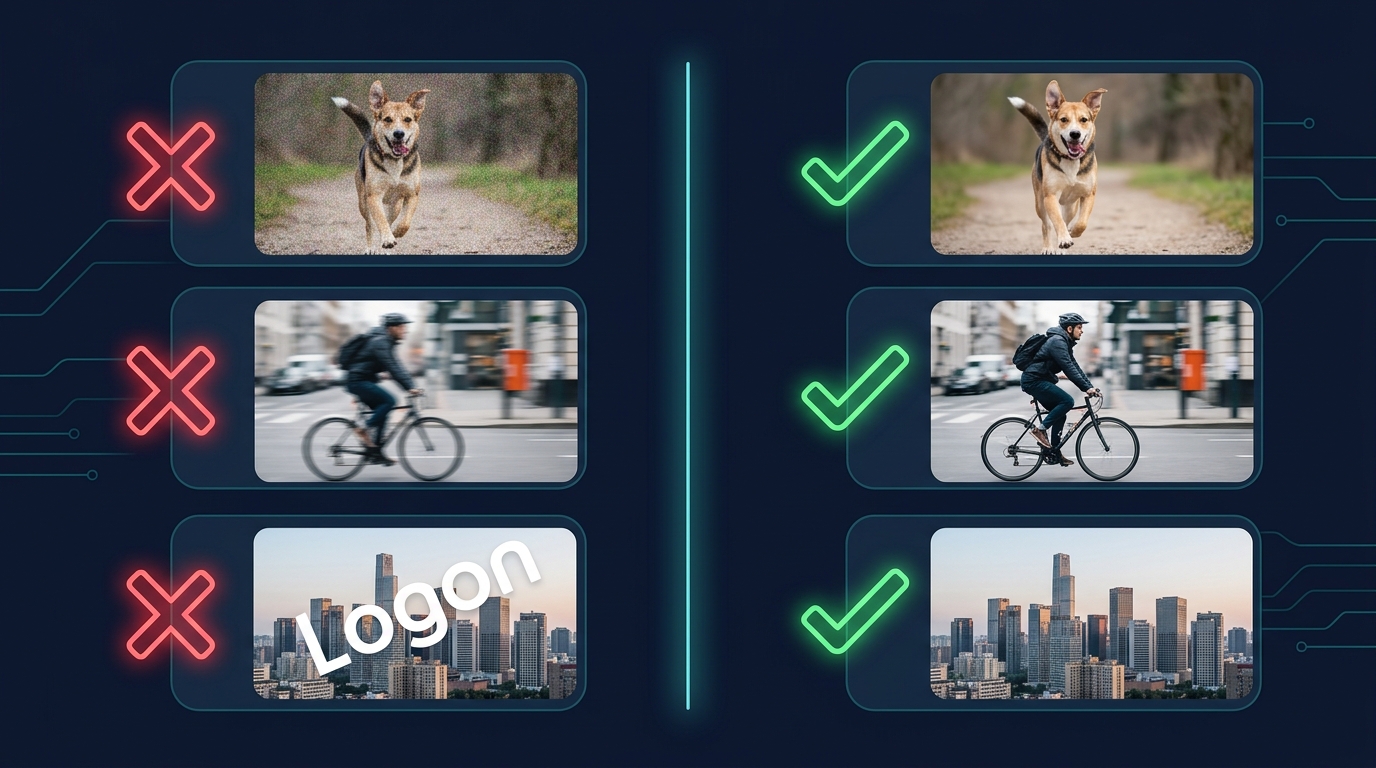
This is the single most common rejection reason across all stock platforms. Reviewers zoom into your image at 100% and look for anything that degrades sharpness or clarity.
What triggers this rejection:
- Visible noise or grain, especially in shadow areas (common with high ISO shots)
- Slight motion blur or missed focus (the subject is not tack-sharp)
- Over-sharpening artifacts (halos around edges from aggressive post-processing)
- JPEG compression artifacts from saving at low quality
How to fix it:
- Shoot at the lowest ISO your lighting allows. If you need ISO 3200+, use dedicated noise reduction software like Topaz DeNoise or DxO PureRAW before uploading.
- Always shoot in RAW. JPEG files lose detail that you cannot recover in post.
- Use a tripod or stabilization for any shutter speed below 1/focal length.
- Export your final files at maximum quality (JPEG quality 12 in Lightroom, or 100% in Photoshop).
- Before uploading, zoom to 100% on every image. If you see noise, softness, or artifacts at full zoom, the reviewer will too.
2. Intellectual Property Violations
Stock platforms are extremely strict about intellectual property. Any recognizable brand, logo, trademark, or copyrighted design in your image will trigger a rejection if the image is submitted as Commercial.
What triggers this rejection:
- Visible brand logos on clothing, electronics, vehicles, or storefronts
- Recognizable product designs (the shape of a specific smartphone, the grille pattern of a luxury car)
- Copyrighted artwork visible on walls, screens, or in the background
- Tattoos with copyrighted designs (cartoon characters, band logos)
How to fix it:
- Clone out or blur all visible logos and brand marks before uploading. Use Photoshop's Content-Aware Fill or clone stamp.
- If removing logos is impractical (e.g., a street scene full of signage), submit the image as Editorial instead. Editorial images can contain brands but cannot be used for advertising.
- Avoid shooting recognizable product designs head-on. Shoot from angles that obscure the brand identity.
- When in doubt, remove it. Reviewers err on the side of caution — if something looks like it might be trademarked, they will reject it.
For a deeper dive into the difference between editorial and commercial licensing, read our guide on editorial vs commercial stock.
3. Missing or Invalid Model Releases
If your image contains a recognizable person and you submit it as Commercial, you need a signed model release. No exceptions.
What triggers this rejection:
- A person's face is clearly visible with no model release attached
- The model release is incomplete (missing date, signature, or witness)
- The model release does not match the person in the image
- A minor appears in the image without a parent or guardian signing the release
How to fix it:
- Use a digital model release app (Adobe Stock has one built in; Easy Release is another popular option). These generate legally valid releases instantly.
- Get releases signed at the time of the shoot, not after. Tracking people down later is unreliable.
- For street photography or candid scenes with recognizable people, submit as Editorial.
- Remember: "Recognizable" does not just mean faces. Distinctive tattoos, uniforms, or unique physical features can also require a release.
4. Similar Content Already in Your Portfolio
Stock agencies penalize contributors who upload too many variations of the same image. If you upload 15 nearly identical shots of the same coffee cup from slightly different angles, most will be rejected.
What triggers this rejection:
- Multiple images with the same subject, composition, and styling
- Batch uploads where the only difference is a minor crop or color temperature shift
- Overloading a niche with redundant content
How to fix it:
- Curate aggressively before uploading. From a shoot of 200 images, select only the 10 to 15 strongest, most distinct compositions.
- Each image in a series should differ meaningfully: different angle, different props, different model pose, or different lighting setup.
- Spread your uploads over time rather than dumping everything at once.
- Think like a buyer: would someone pay for both of these images, or are they essentially interchangeable?
5. Over-Processing and Unnatural Edits
A moderate amount of post-processing is expected and welcomed. But heavy-handed editing that makes the image look artificial or unrealistic will get rejected.
What triggers this rejection:
- HDR effects that create halos, unnatural contrast, or a "painted" look
- Extreme saturation or vibrance that makes colors look unrealistic
- Heavy skin smoothing that removes all texture (the "plastic skin" look)
- Selective color effects (black-and-white with one color element left in)
- Aggressive vignetting or lens flare overlays
How to fix it:
- Aim for a clean, natural look. The best-selling stock images are subtly enhanced, not obviously manipulated.
- Process your RAW files for proper exposure, white balance, and light contrast adjustments — then stop.
- If you use skin retouching, zoom to 100% and make sure natural skin texture is still visible.
- Avoid trendy filter effects. They date quickly and limit the buyer's ability to use the image in different contexts.
6. Poor Composition and Framing
Reviewers assess whether an image has commercial value. A technically perfect photo with poor composition will still get rejected because no buyer would want to use it.
What triggers this rejection:
- Cluttered backgrounds that distract from the subject
- Awkward cropping that cuts off important elements (hands, feet, tops of heads)
- No clear focal point — the viewer's eye has nowhere to land
- Tilted horizons in landscape or architectural shots
- Dead space that serves no compositional purpose
How to fix it:
- Follow the rule of thirds, but also consider leaving copy space (negative space where a designer can place text). Images with natural copy space sell significantly better.
- Check your edges before pressing the shutter. Is anything intruding from the side of the frame?
- Straighten horizons in post. Even a 0.5-degree tilt is noticeable.
- Shoot both horizontal and vertical orientations of the same scene. Buyers need both, and it doubles your portfolio without doubling your shoot time.
7. Lighting Problems
Flat, harsh, or uncontrolled lighting is a common rejection trigger, especially for indoor and portrait photography.
What triggers this rejection:
- Harsh midday shadows on faces (raccoon eyes)
- Mixed color temperatures (warm tungsten and cool daylight in the same scene)
- Underexposure with crushed shadows or overexposure with blown highlights
- On-camera flash creating flat, unflattering light with hard shadows
How to fix it:
- For natural light, shoot during golden hour (the hour after sunrise and before sunset) or in open shade for the most flattering, even illumination.
- For indoor shoots, bounce your flash off the ceiling or use a softbox. Never point a bare flash directly at your subject.
- Check your histogram before leaving the location. Make sure you are not clipping highlights or crushing shadows.
- If you are mixing light sources, use gels to match color temperatures, or convert to black and white.
8. Insufficient Metadata
This rejection reason catches many contributors off guard. Some platforms will reject images not because of the image itself, but because the title, description, or keywords are inadequate or irrelevant.
What triggers this rejection:
- Generic or vague titles like "Beautiful photo" or "Nature shot"
- Fewer than 5 keywords (most platforms expect 15 to 50)
- Keywords that do not match the image content (keyword stuffing or irrelevant tags)
- Missing descriptions on platforms that require them
- Titles or keywords in the wrong language
How to fix it:
- Write descriptive, specific titles: "Young woman working on laptop in modern co-working space with natural light" is far better than "Woman working."
- Use 35 to 50 keywords, ordered by relevance. The first 5 to 10 carry the most weight on Adobe Stock.
- Never copy-paste the same keywords across unrelated images. Each image should have unique, accurate metadata.
- Use SubmitAI to generate platform-optimized titles, descriptions, and sorted keywords in seconds. The AI analyzes your image content and produces metadata specifically structured for Adobe Stock and Shutterstock search algorithms.
For a complete guide to metadata optimization, see our article on how to keyword stock photos.
9. Isolated or White Background Issues
Product-style images on white backgrounds are a popular and profitable category, but they have extremely strict technical requirements.
What triggers this rejection:
- The background is not pure white (off-white, gray tones, or uneven lighting)
- Shadows or reflections bleed beyond the product area
- The product edge has visible fringing or color aberration
- The isolation is sloppy — stray pixels, visible clipping paths, or rough edges
How to fix it:
- Light your background separately from your subject. The background should be at least 1 to 2 stops brighter than the subject.
- In post, use Levels or Curves to push the background to pure white (RGB 255, 255, 255) without blowing out the subject.
- Zoom to 200% and inspect the edges of your isolated object. Clean up any fringing with the Defringe tool in Lightroom or the Refine Edge tool in Photoshop.
- If you shoot products regularly, invest in a light tent or seamless white backdrop and two dedicated background lights.
10. Legal and Ethical Content Issues
Some rejections are not about quality at all — they are about content that stock agencies cannot legally or ethically distribute.
What triggers this rejection:
- Images of currency, government buildings, or military installations (restricted in many jurisdictions)
- Photos taken in locations that prohibit commercial photography (museums, private events, concert venues)
- Content that could be considered defamatory, discriminatory, or exploitative
- Images of minors in potentially sensitive contexts
How to fix it:
- Research the photography rules for your location before shooting. Many public spaces have restrictions that are not posted prominently.
- When shooting near government or military property, stay on public land and avoid capturing security features.
- For images involving children, ensure a parent or guardian is present, the context is clearly positive and safe, and you have a signed model release.
- When in doubt, check the contributor guidelines for your specific platform. Each agency has its own content policy.
Your Rejection Recovery Workflow
When an image gets rejected, do not just delete it and move on. Use this systematic workflow:
- Read the rejection reason carefully. Match it to one of the categories above.
- Zoom to 100% and inspect. Many technical issues are invisible at normal viewing sizes.
- Fix and resubmit. Most platforms allow resubmission after corrections. Cloning out a logo or reducing noise can turn a rejection into an acceptance.
- Learn the pattern. If you keep getting the same rejection reason, it points to a systemic issue in your workflow that needs addressing.
- Optimize your metadata. Even if the image is resubmitted with the same visual content, improved titles and keywords can change the reviewer's perception of commercial viability.
The Bottom Line
Stock photo rejections are not personal — they are quality gates that protect buyers and maintain the platform's standards. The contributors who succeed are the ones who treat each rejection as actionable feedback.
Focus on the fundamentals: sharp images, clean edits, proper releases, no visible brands, strong compositions, and optimized metadata. Master these, and your acceptance rate will climb well above 90%.
Every rejection you understand and fix today makes your next 100 uploads stronger. Start with the checklist above, and build the habits that separate hobbyists from professional stock contributors.